


After a slight fall in the autumn flu, I decided to take the network expert analyzer to the table. The idea was to clarify the adequacy of the broadband service offered by our house to my family’s needs with professional tools. The results were surprising and degradable.
I often speculate, do I need more capacity (access speed), and what application? The focus of interest was also the latency of the cloud services that most affected the app’s speed and user experience. I simulated the environment when the family is elsewhere. (privacy).
I started testing by making sure that the home broadband connection and the local network (LAN and WiFi) work flawlessly. The Cisco cable modem is in the “bridge” mode and without any filters, so it does not form a bottleneck. As a router and NAT device is a Fortinet UTM firewall device, for which, as a precaution, I removed all malware and other filters. I also removed the services advertised on the network to ensure that they are not subjected to extra traffic during the test. With the powerful workstation and SpeedTest program, I ensured that the overall capacity of the package would work as agreed. (Broadband is 10/10Mbps).
The analyzer is a Network TAP integrated unique model that copies all traffic (including errors) without packet loss. TAP was installed between the Cisco cable modem and the Fortinet firewall. The copied data was deposited directly into the analyzer. When I prepared the analyzer, I noticed that some traffic was to Russia even though no application was running. The guilty were quickly found, i.e. the SpeedTest program generated traffic, so I removed it.
For testing, I started by connecting the typical family Friday evening entertainment arsenal, which includes the assumption that there are also children’s friends.
- 1 x NetFlix series Samsung SmartTV (connected to home LAN/CAT6 network 100Mbps)
- 1 x HBO series on another Samsung SmartTV (connected to home LAN/CAT6 network 100Mbps)
- 1 x Sonos Wireless speaker and Spotify music. (Sonos Master LAN/CAT6 online)
- 1 x iPhone 7 YouTube Video (Apple 802.11 ac WiFi)
- 1 x iPad YouTube Video (Apple 802.11 ac WiFi)
- 1 x MacBook YouTube music video + Trading magazine simultaneously (Apple 802.11ac WiFi)
Video entertainment
Although in use only 10/10Mbps house Broadband is honestly noted that all programs work perfectly and flawlessly. Only the last launch of the HBO series took slightly longer than usual. I knew in advance that rarely the content of entertainment uses over 5Mbps bandwidth. Cloud application will not succeed if their capacity needs outweigh the average available network capacity and technology. NetFlix automatically set itself at a level of 2,95Mbps (peak load of 4,90Mbps) when using a full Friday arsenal. I disabled one by one the devices and turned them off. NetFlix was left, but it did not increase the capacity, even though it was very free. I ended the test by stating that 10/10Mbps is sufficient for power to be ideal for normal family entertainment usage. If I would like all the content to be high definition (HD) could a 25/10Mbps subscription be the best broadband package?
Microsoft and Google
Next, I wanted to find out Microsoft OneDrive and Google Dropbox bandwidth requirements. I decided to transfer 500MB of miscellaneous files from my workstation to those services. The files contain GoPro HERO videos, Olympus camera RAW photos, as well as miscellaneous PowerPoint, Excel, and Word files. I use both personal and business folders from both vendors. One of these cloud providers was faster but reaching only 7Mbps peak rate. Speed reached because the transfer delay was shorter when the servers were closer to Helsinki. Microsoft Skype and Teams also work well. Again, I noticed that the 10Mbps uplink speed is enough to be perfect for regular use. I do not need a faster interface.
News and Magazines
I also wanted to understand the typical morning usage profile for reading the Digi magazines of the day. Morning TV is also on, but the TV broadcast does not consume my data network capacity. During the test, the use of my mouse was more active than normal behavior. Reading the commercial magazine using the Safari browser using the network bandwidth of about 1,2Mbps (peak). The loading digital copy of the magazine was 8,35Mbps (peak). The Helsingin Sanomat website contains more videos, and the peak comes already close to my subscription maximum speed. The peak load was 9,2 Mbps. In both cases, the content comes from the CDN content distribution network (cache). The transfer delay was approximately 85 milliseconds.
Transfer Delay and Network latency testing
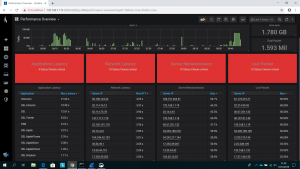
In the afternoon, I analyzed the cloud services I used during the day. I want to understand the latency (transfer delay) because it has the most significant impact on app speed and user experience. However, when the quality of the corporate network calibrated to my analyzer, it displays bright red warning lights for overall performance.
The following applications can be found in my analyzer TOP list: Microsoft Linkedin, O365, and OneDrive Business (O365), Cisco Webex, Google Dropbox, Apple, Amazon, Twitter, NetFlix, HBO, YouTube. Also, there were some known SSL and CDN Services (mm Akamai) separately listed.
I’ll be viewing the first 23 services from our list. I do not want to put the services ranked because most of the services will work for my needs. At its weakest latency is 20.54 seconds (more than 20 000 milliseconds). The best in the list is 11.52 milliseconds. Thirteen of the lowest service cannot reach anywhere near 1 second (i.e., less than 1000 milliseconds) lag. It should noted here that this is not just a network delay. The analyzer displays the actual transfer delay based on the timestamps of the server and workstation packets.
Summary
For TV Entertainment, the future 4K (UHD) broadcasts require more network capacity. Netflix recommends 25Mbps and Amazon 15Mbps. If less capacity is available, the video quality will be automatically undermined. 4K content is not yet common. We are happy with the current high definition (HD). I noticed again, 25/10Mbps broadband would be a well-reasoned alternative.
The market talks a lot about 5G networks and its low latency of 1 millisecond (forgetting to mention that the 3GPP standard for URLLC will be ready for the earliest 2021). The result of the test shows clearly that radio network latency does not have the significance of any realm in the use of those cloud computing services. It is a small proportion of the entity between the user’s application and the cloud service. At the same time, it could be said that the transfer delay of the house broadband is not optimal at all. If you compare it to the corresponding corporate (Internet or MPLS) network, the transfer delays are too long.
The broadband market and marketing in Finland is very access speed driven by both mobile and fixed broadband. At times it is also assumed that as cloud services continue to grow, the need for access speeds will also increase. Unfortunately, this is not the case, but quite the opposite. The further the local services move and the application latency increases, the access speed can be utilized. We live on the edge of the world.
Perhaps in the next flu, I will test the 5G broadband accordingly and compare it to fixed broadband
Read also blog about app optimization and network emulation
Read also blog why and what affects application speed.
Hannu Rokka,
Senior Advisor 5Feet Networks Oy